
10 Processes to Automate First, with KPIs and Benchmarks Every Procurement Team Should Know
Many procurement teams still spend 60–70% of their time on manual, time-consuming administrative tasks, such as creating purchase requisitions, verifying prices, and following up on approvals via email. Yet, many of these processes can be automated.
For years, many organizations have viewed procurement simply as the department responsible for “buying things.” In reality, procurement plays a critical role in an organization’s bottom line — from controlling costs and managing supplier risk to ensuring supply chain continuity.
When procurement teams spend too much time on repetitive manual tasks, they have less time to focus on strategic activities that can drive greater business value.
This is why procurement automation has become an increasingly important topic for procurement leaders. But the key question is: Which procurement processes should you automate first, and how can you measure whether the investment is delivering real value?
In this article, Pantavanij takes an in-depth look at the 10 procurement processes that organizations should prioritize for automation, along with the key KPIs to track, calculation formulas, industry benchmarks, and common mistakes to avoid when implementing procurement automation.
By the end of this article, you’ll have practical insights to help you identify the right processes to automate, measure the impact of automation, and build a more efficient and strategic procurement function.
Why Procurement Automation Matters
Time Wasted on Low-Value Manual Work
Procurement teams should focus on negotiation and strategy, not form-filling. When most of the day goes toward repetitive tasks, the organization loses the opportunity to extract more value from procurement.
Human Error
Re-entering data across multiple systems increases the risk of mistakes — mistyped prices, incorrect quantities, or approvals skipped out of order — all of which affect the accuracy of financial data downstream.
Long Cycle Times
Email-based approvals often delay processes by days, especially when approvers are away from their desks or a request gets buried in an inbox nobody checks.
Lack of Clear Audit Trails
Difficult to trace back when issues arise, since data is scattered across emails, spreadsheets, and paper documents — making audits and internal reviews take far longer than they should.
Rising Maverick Spend
Without controls in place, employees tend to buy outside negotiated contracts, losing discounts and increasing compliance risk (explained in detail in the next section).
Key Concepts You Should Know Before You Automate
What Is Procurement Automation?
The use of software systems to replace repetitive tasks in the procurement process — from requisition creation through approval and PO issuance — minimizing manual intervention. These systems typically span from upstream sourcing to downstream payment, often referred to as Source-to-Pay (S2P).
RPA vs. Workflow Automation
- RPA (Robotic Process Automation) suits fixed-pattern tasks like copying data between systems or extracting data from a PDF into an ERP.
- Workflow Automation suits multi-step approval processes, such as approving POs based on spending thresholds, which rely on predefined business logic and conditions.
Both can work together within a single digital procurement platform — organizations don’t need to choose only one.
What Is Maverick Spend, and Why Should Procurement Teams Care?
Maverick spend refers to purchases that fall outside an organization’s defined procurement process — buying off-contract, outside the preferred supplier list, or skipping the required approval steps.
Read Related Articles Maverick Spend
Common impacts of maverick spend:
- Loss of negotiated volume discounts with strategic suppliers
- Increased compliance and audit risk
- Inaccurate spend analysis, which leads to flawed budget planning
- More manual work, since the data isn’t captured systematically
How automation reduces maverick spend: An eRFX / e-catalog system that enforces buying through an approved supplier list, combined with automated approval workflows, effectively closes off off-system purchasing — and gives procurement teams real-time visibility into maverick spend % via a dashboard.
10 Processes to Automate First
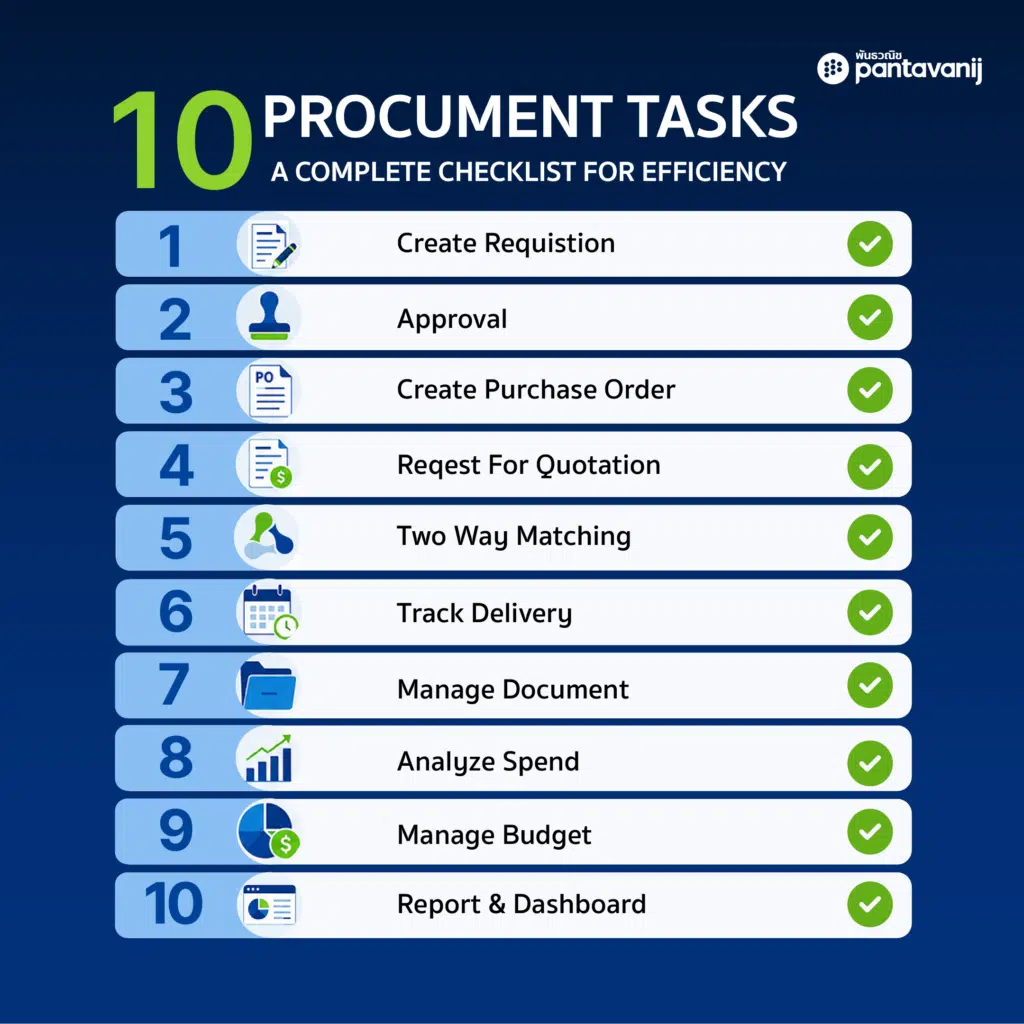
1. Purchase Requisition (PR) Creation
Digital forms replace email requests, capturing data in a standardized format from the start and reducing incomplete or inconsistently formatted submissions.
2. Approval Workflow
Automatic approvals based on spending limits and hierarchy (an approval matrix) notify the right people instantly and let them approve from their phones — reducing what piles up in email inboxes.
3. Purchase Order (PO) Generation
Auto-generate POs from approved PRs without re-entering data, reducing the risk of mismatched figures or product details between steps.
4. Supplier Quotation Collection
Send and collect quotes through an online system, making it easier and more transparent to compare pricing and terms across multiple suppliers.
5. Two-Way Matching
Automatically match POs, delivery receipts, and invoices — reducing payment disputes and cutting down the manual document-checking work for the finance team.
6. Contract Renewal Alerts
Automated reminders before contract expiration prevent delayed renegotiations or contracts lapsing unnoticed — which can mean losing favorable supplier terms.
7. Supplier Onboarding Documentation
Collect supplier documents digitally — business registrations, certifications, tax documents — reducing the time it takes to onboard a new supplier.
8. Spend Categorization
Automatically categorize expenses for analysis, giving procurement a clear view of spend by category — and making maverick spend easier to spot.
9. Budget Check
Real-time budget verification before approval prevents requests that exceed the allocated budget from getting approved in the first place.
10. Reporting & Dashboard Generation
Automated KPI reports instead of manual compilation give leadership real-time visibility into procurement performance, without waiting for a team to compile reports at month-end.
KPI Table & Formulas to Track After Automation
Automating without measuring results is like investing without knowing the return. The table below covers the core KPIs procurement teams should track consistently, along with formulas you can apply directly.
| KPI | Formula | Why It Matters |
| PO Cycle Time | Average (PO issue date − PR submission date) | Measures overall procurement process speed |
| Automation Rate (% of POs auto-generated) | (Number of auto-generated POs ÷ Total POs) × 100 | Tracks how far automation has actually progressed |
| Maverick Spend % | (Off-contract / off-system spend ÷ Total spend) × 100 | Measures spend leakage outside controlled channels |
| Touchless Invoice Rate | (Invoices processed with no manual touch ÷ Total invoices) × 100 | Reflects effectiveness of three-way matching |
| Cost per PO | Total procurement operating cost ÷ Number of POs processed | Compares cost efficiency before vs. after automation |
| Contract Compliance Rate | (Spend under active contract ÷ Total spend) × 100 | Higher rate = lower maverick spend |
| Approval Cycle Time | Average time from submission to final approval | Highlights bottlenecks in the workflow |
| Automation ROI | (Savings achieved − System investment cost) ÷ System investment cost × 100 | Used to evaluate the payoff of the automation project |
Tip: Focus on just 3-4 core KPIs when you’re starting out, so the team isn’t overwhelmed — then expand to the rest once the system and data have stabilized.
Rough Indicative Benchmarks
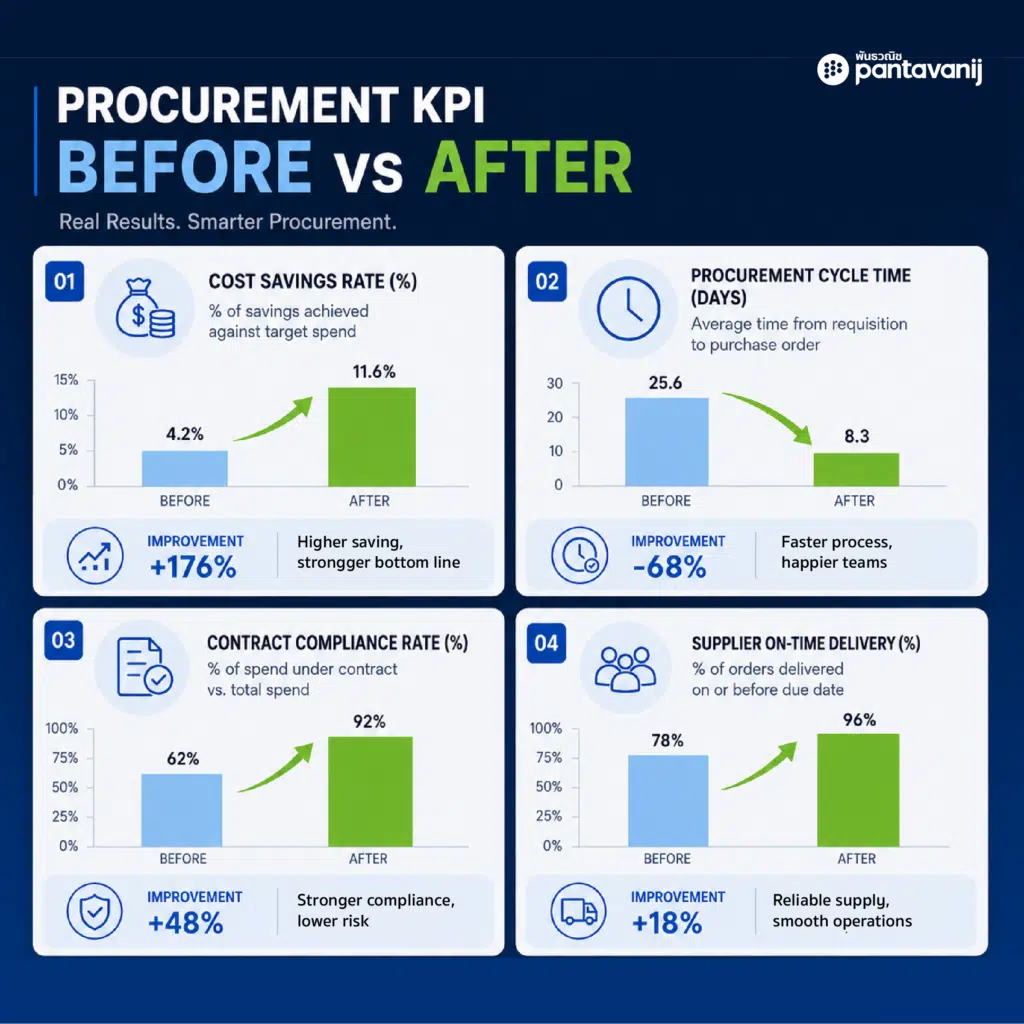
The figures below are rough, indicative industry benchmarks for comparison. Actual numbers vary by company size, industry, and system maturity — use them as directional targets, not fixed standards.
| KPI | Mostly-Manual Organizations | Automated Organizations (Leading Practice) |
| PO Cycle Time | Several days to 1-2 weeks | Within 1-2 days or faster |
| Touchless Invoice Rate | Below 20% | 60-80%+ |
| Maverick Spend % | 20-30% or higher | Below 10% |
| Cost per PO | Higher, due to heavy manual labor | Significantly reduced after automation |
Organizations just getting started don’t need to hit leading-practice numbers immediately. Consider a staged target — for example, cutting PO cycle time in half in year one, then tightening the target the following year.
Common Mistakes When Starting Automation
1. Trying to Automate Everything at Once
Overcomplicates the project and creates resistance. Start with high-volume, rule-based processes first, then expand gradually.
2. Not Adapting Workflows to Real Business Rules
Copying the old manual process into the new system instead of removing unnecessary steps just results in “a digital version of the same problem,” not a genuinely better process.
3. Not Involving Finance and Other Stakeholders
Results in approval workflows that don’t match actual policy, often requiring costly rework later.
4. Skipping Data Standardization Before Automating
Messy supplier or item master data causes the automated system to break — for example, failing to match a PO to an invoice because the supplier name is spelled inconsistently.
5. Not Measuring KPIs Post-Implementation
Investing in a system without proof of ROI makes it impossible to evaluate success — and much harder to secure budget for the next phase.
6. Overlooking Change Management
Employees don’t understand the new system and quietly revert to manual workarounds — which itself drives maverick spend. Ongoing communication and training matter just as much as the system itself.
Best Practices
- Start with high-volume, rule-based processes for the fastest ROI.
- Design flexible workflows that accommodate exceptions and special cases.
- Train teams alongside implementation to reduce resistance to change.
- Measure ROI every 3-6 months post-automation for continuous improvement.
- Track maverick spend % regularly to monitor policy compliance over time.
How Technology Helps
A purpose-built digital procurement platform can automate all 10 processes above within a single system, without building custom RPA separately — significantly reducing cycle time and minimizing errors from duplicate data entry, while also helping control maverick spend by enforcing an approved supplier list.
A good system should also integrate with the ERP an organization already uses (such as SAP or Oracle), so data flows continuously from procurement through to accounting and finance, without re-keying information across systems.
How Pantavanij Supports This Journey
Pantavanij’s eRFX is designed to cover the full digital procurement process end-to-end — from PR and RFQ creation, to workflow-based approvals, to automatic PO issuance — helping organizations start automating without building systems in-house, complete with dashboards to track KPIs and maverick spend in real time.
Learn more about eRFX Solution
Book a Demo / Contact Pantavanij Sales Team
Not sure which processes to automate first? The Pantavanij team offers a free consultation to help identify your quickest wins.
Frequently Asked Questions
Q1 : Is procurement automation suitable for small organizations?
A : Yes — it benefits organizations of all sizes by reducing manual work from day one, without always requiring a large investment.
Q2 : How long does it take to see ROI from automation?
A : Organizations typically see cycle time improvements within 1-3 months, with clear cost ROI within 6-12 months.
Q3 : Will automation replace procurement jobs?
A : No. Automation removes low-value manual work, freeing procurement teams to focus on strategic activities like negotiation and supplier management.
Q4 : Which process should be automated first?
A : Approval workflow and PO generation are recommended first, as they have the highest impact on cycle time and deliver the fastest visible results.
Q5 : How is maverick spend measured, and can it really be reduced?
A : It’s measured as the percentage of total spend that falls outside contracts or the approved supplier list. Deploying an e-catalog system with enforced approval workflows can meaningfully reduce this number over time.
Q6 : How is procurement automation different from e-procurement?
A : E-procurement broadly refers to running procurement through digital systems. Procurement automation specifically focuses on making the processes within e-procurement run with minimal human intervention — it’s a component of e-procurement rather than a separate category.
Q7 : Can procurement automation integrate with our existing ERP?
A : A well-designed digital procurement system should integrate with your core ERP so procurement, accounting, and finance data flow continuously. Confirm this capability before selecting a vendor.
Q8 : How should we choose a procurement automation vendor?
A : Consider end-to-end process coverage, integration capability with existing systems, workflow flexibility, and real-time KPI dashboards.
Procurement automation is no longer a future consideration
It’s essential for organizations aiming to stay competitive in 2026. Starting with the 10 highest-impact processes, tracking the right KPIs, and avoiding common pitfalls helps organizations see tangible results quickly while laying the foundation for full digital procurement maturity.
Read more Procurement Trends 2026